

Deploy & Redeploy
How deployment works in QuickStack: when changes take effect, environment variables, and common gotchas.
In QuickStack, clicking Deploy is the only way to apply changes. Configuration edits (env vars, storage, domains, Git source, image name) are staged in the database but do not affect the running container until you click Deploy.
This is intentional: you can batch multiple config changes and apply them all at once.
What "Deploy" does
- For Git-source apps: pulls the latest commit from the configured branch, then builds a new Docker image using the configured build method (Railpack or Dockerfile), and pushes it to the internal registry.
- For Docker image apps: pulls the specified image tag from the configured registry.
- Applies all staged config changes (env vars, volumes, domains, network policies, health checks, etc.).
- Performs a rolling update: new pods are started, old pods are terminated once the new ones are healthy.
No zero-downtime guarantee without health checks Without a configured health check, Kubernetes marks pods ready as soon as they start, which may be before your app is actually serving requests. Configure a readiness probe for zero-downtime deploys.
Deployment history
The Overview tab shows a history of recent deployments. For Git-source apps, each entry displays the git commit message of the commit that triggered the build, making it easy to track which code change corresponds to each deployment.
Kubernetes events (pod scheduling, image pull, container start/stop) are streamed directly into the deployment log, providing richer context when diagnosing a failed or slow deployment.
Running multiple builds If multiple builds are triggered at the same time, they queue in PENDING state and start as build slots become available. An administrator can allow several builds to run at once with Max Parallel Builds in Build Container Settings.
Rollback to a previous deployment
For Git-source apps, QuickStack can redeploy the code from an earlier commit.
- Open the app's Overview tab and find it in the Deployments table.
- On an eligible deployment, open the actions menu and choose Rollback to this deployment.
- Confirm the short commit hash in the dialog.
QuickStack reapplies the image that was built for that commit. If that image is no longer in the internal registry, it rebuilds the commit first. Rollback deployments are marked with a purple Rollback badge in the deployment list.
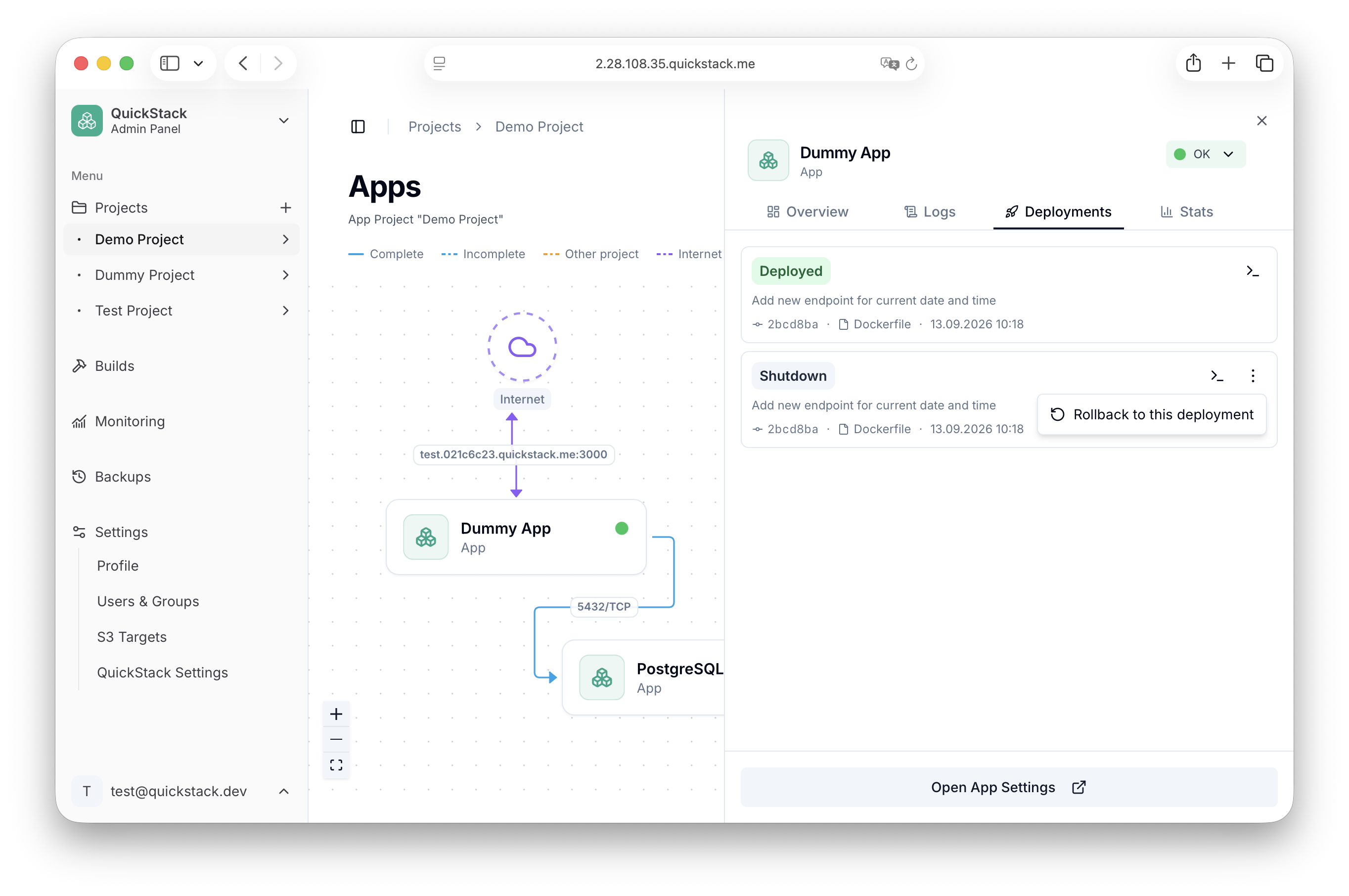
Rollback replaces the running version Rolling back redeploys the app at the selected commit. Any configuration staged since then is applied as well. Make sure the target commit is the one you want to run.
Immutable commit tags
Each Git build is tagged with its 7-character commit hash in addition to the moving latest tag. Deployments resolve images by commit tag, so a running deployment stays pinned to the code it was built from. Rollback is only available for Git-source apps.
Environment variables
Environment variables are key-value pairs injected at runtime. They are stored in the QuickStack database and applied during the next deploy.
Editing env vars
- Open your app and go to the Environment tab.
- Edit variables in the text area, one
KEY=VALUEper line. - Click Save.
- Click Deploy for changes to take effect.
DATABASE_URL=postgres://user:pass@svc-app-xyz:5432/db
API_KEY=secret-api-key-123
NODE_ENV=production
PORT=3000
Redeployment required Changing env vars does not update the running container. You must Deploy again.
Database apps For database applications deployed via templates, do not manually change automatically generated env vars — this may break the pre-configured setup.
Referencing other apps (internal service discovery)
To connect to another app in the same project, use its internal service URL:
DATABASE_URL=postgres://user:pass@svc-app-xyz.<project-id>.svc.cluster.local:5432/mydb
REDIS_URL=redis://svc-app-abc.<project-id>.svc.cluster.local:6379
Copy the exact value from the app's Domains & Networking tab → Network Policy → rule actions → Copy internal hostname. See Networking for details.
Advanced: force-pull latest image tag
For Docker image apps using a mutable tag (e.g. :latest), clicking Deploy always pulls the latest version of that tag. There is no caching of mutable tags.
For Git apps, Deploy always builds from the latest commit on the configured branch.