

Users & Groups
Manage users, groups, and per-project permissions in QuickStack.
QuickStack's access control is organized into Users, Groups, and Permissions:
- Users — individual accounts that log into QuickStack.
- Groups — collections of permissions assigned to users.
- Permissions — granular access controls per project and optionally per app.
Accessing user management
Go to Settings → Users & Groups. The page has three tabs: Users, Groups, and SSO Providers.
Managing users
Create a user
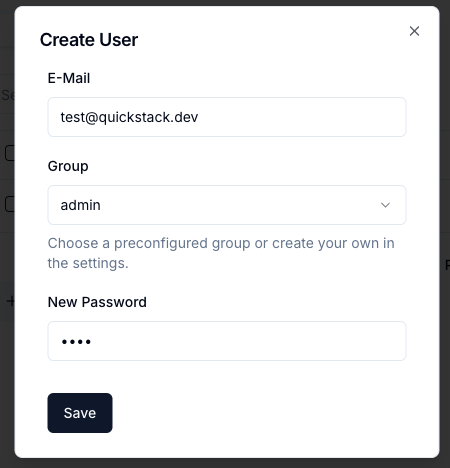
- Click Create User.
- Enter: Email (used for login), Password, Group.
- Click Save.
The OAuth Providers column shows which external identity providers a user has linked. See Single Sign-On.
Edit or delete a user
Find the user in the table and click the pencil (edit) or trash (delete) icon.
Admin protection You cannot delete your own admin account while logged in.
Managing groups
Switch to the Groups tab.
Default admin group
A built-in Admin group with full access exists and cannot be deleted or modified.
Create a group
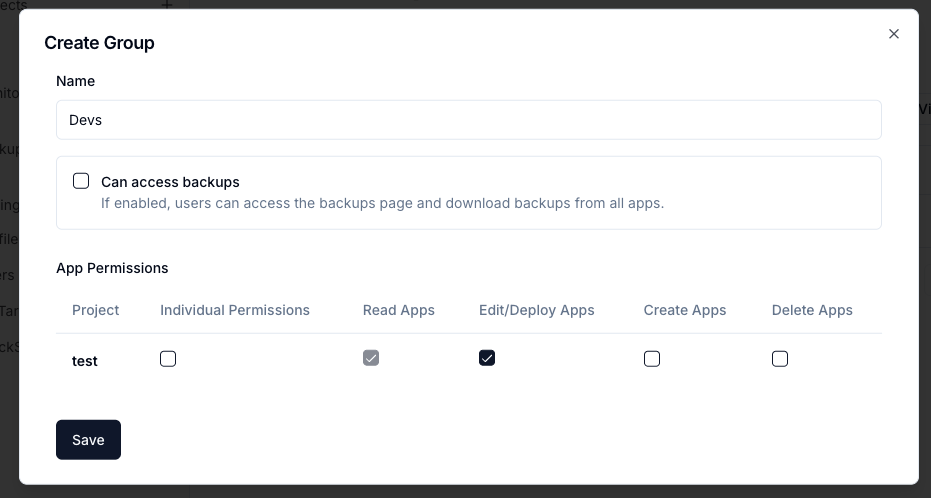
- Click Create Group.
- Enter a Group Name (e.g.
Developers,Viewers). - Configure project permissions (see below).
- Click Save.
Group deletion warning When a group is deleted, users assigned to it lose all permissions until reassigned.
Permissions model
Project-level permissions
For each project, grant:
| Permission | Allows |
|---|---|
| Read Apps | View applications and their configurations |
| Write Apps | Modify settings, deploy applications |
| Create Apps | Create new applications |
| Delete Apps | Remove applications |
Per-app permissions
Enable Set permissions per App for a project to override project-level settings for specific applications. Useful for giving a user write access to one app but read-only to others.
Permission inheritance
- No project permission → no access to any apps in that project.
- Project-level permission → same permission for all apps.
- Per-app permission → overrides the project-level setting for specific apps.
Single sign-on (SSO)
QuickStack can authenticate users through an external identity provider such as OIDC, Google, Entra ID, or GitHub. Configure providers in the SSO Providers tab; each provider has its own Default Group for new users.
See Single Sign-On for setup, redirect URLs, and account linking.